The diaper is changed, the baby is wriggling, and your phone is across the room. A button stuck to the side of the changing table, one press and it's logged, sounds like a small thing until you've used it twenty times in a weekend.
If your home already runs on Home Assistant, nappi plugs straight into it. Setup takes about ten minutes, and you won't write a line of code. You end up with diaper and bottle buttons, switches for the sleep, nursing and pumping timers, and sensors that know when the baby last ate.
What you need before you start
- nappi Premium. Smart home connections are part of Premium, and one subscription covers everyone in your family.
- Home Assistant 2025.10 or newer running at home. A Home Assistant Green, a Raspberry Pi or a server in a closet all work.
- HACS, Home Assistant's community store. If you don't have it yet, follow the HACS install guide. It's the fiddliest part of the whole thing, and you only do it once.
- A computer. A phone works too, but copying a long key is easier on a bigger screen.
Step 1: Make a connection key in nappi
A connection key lets Home Assistant log for your family. Think of it as a spare house key that only opens the smart home door.
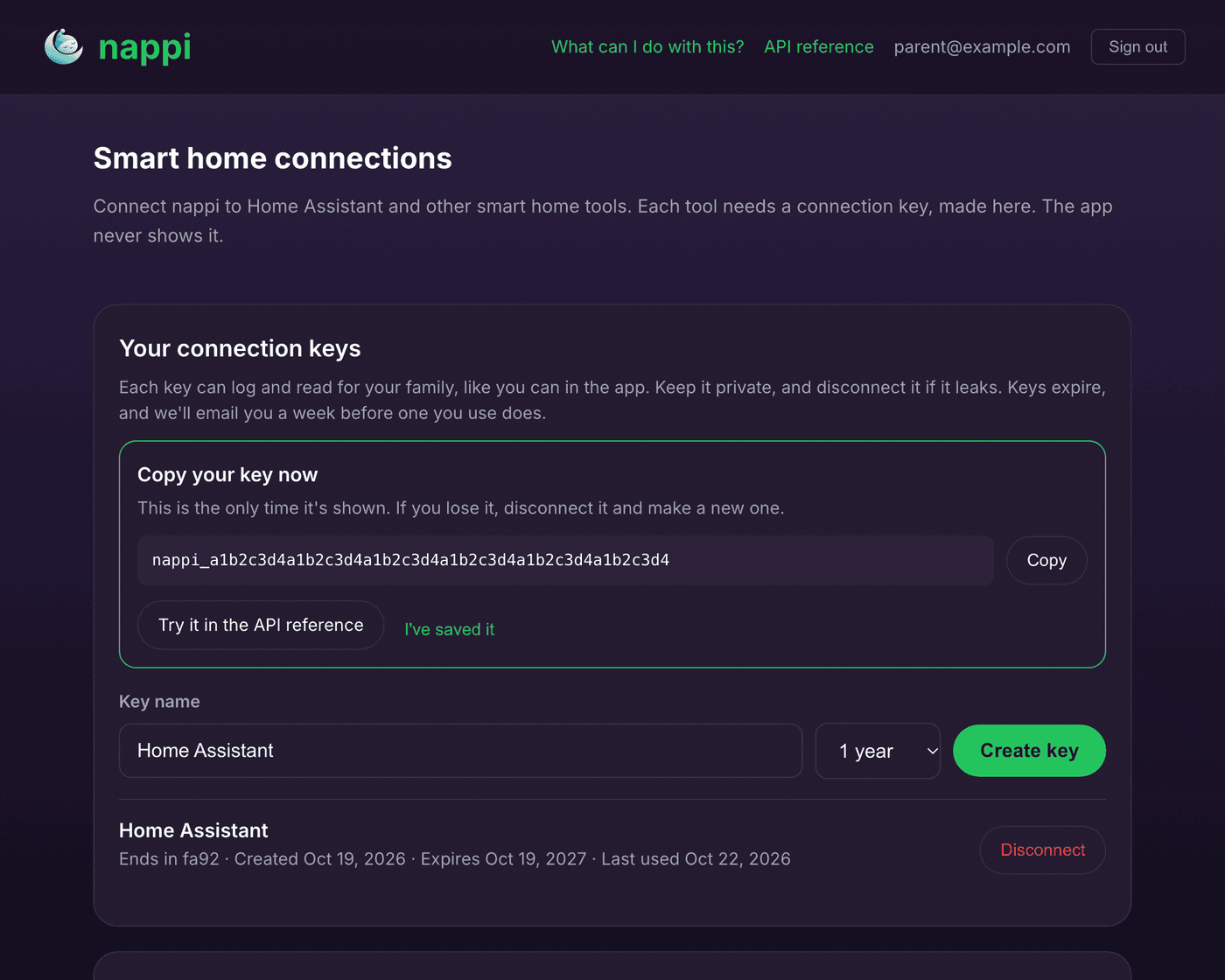
- On your computer, go to nappi.app/app/connections and sign in with your nappi account.
- Give the key a name you'll recognize, like "Home Assistant".
- Pick how long it should last. 1 year saves you from reconnecting often, and we'll email you a week before it runs out.
- Click Create key, then Copy. The key is shown only once, so keep that browser tab open until Step 3.
Step 2: Install nappi in Home Assistant
- Open Home Assistant in your browser.
- Click Open nappi in HACS. The first time, it asks for your Home Assistant address (often
http://homeassistant.local:8123), then opens HACS right on the nappi page. - If HACS asks whether to add the repository, click Add.
- Click Download and confirm.
- Restart Home Assistant from Settings → System, using the power icon in the top right.
Step 3: Add your baby
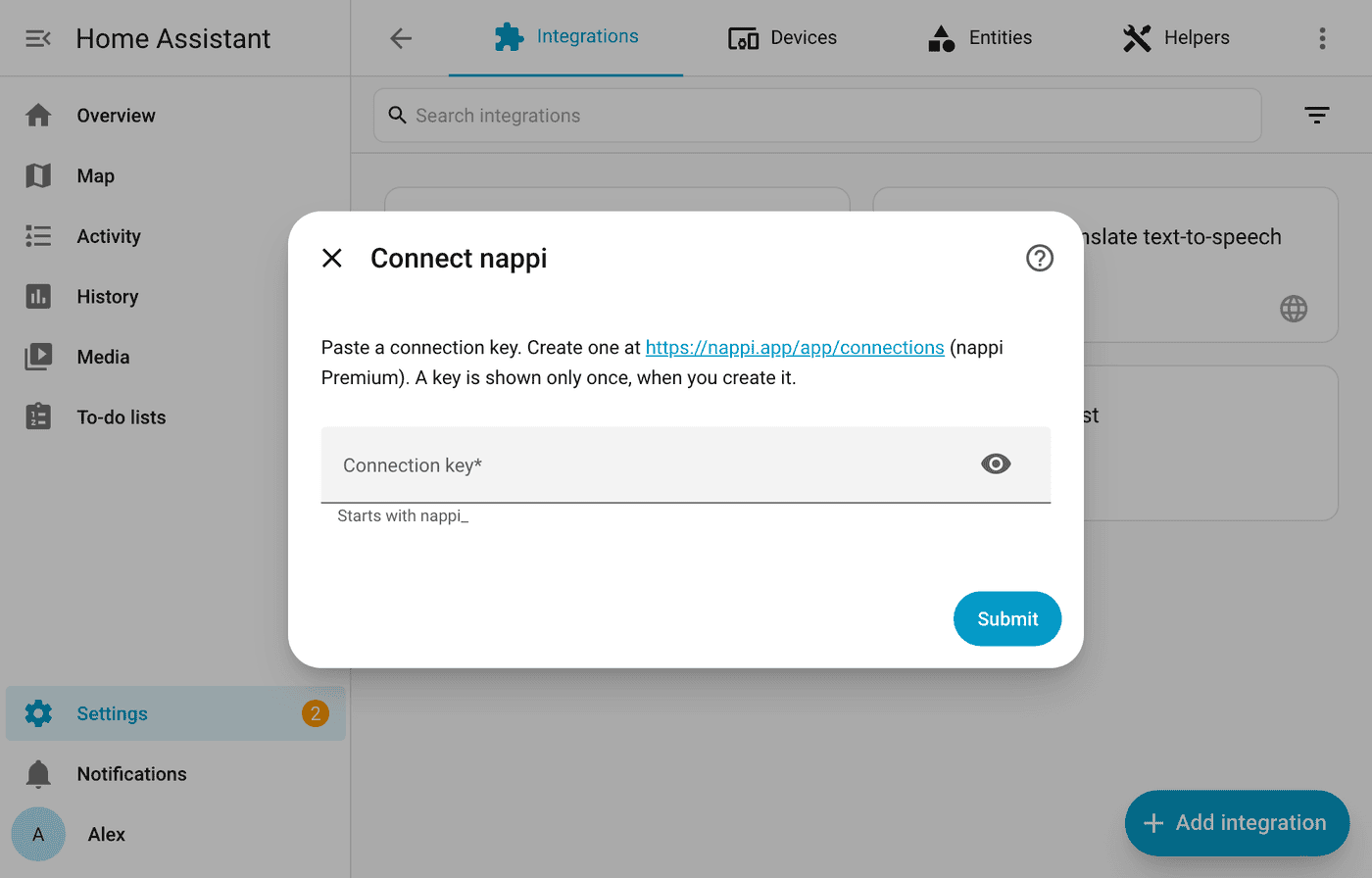
- Go to Settings → Devices & services, click Add integration and search for nappi. Or click Add nappi to Home Assistant.
- Paste your connection key and click Submit.
- If you have more than one baby, pick one. Twins or siblings get their own device: add the integration again with the same key and pick the next baby.
That's it. A new device shows up with your baby's name on it.
What does the integration add?
Open the device and you'll find buttons for Log wet diaper, Log dirty diaper, Log mixed diaper and Log bottle. The bottle button logs the amount and contents you choose on the same device page, in milliliters or ounces.
The Sleep timer, Nursing timer and Pumping timer switches turn on whenever that timer runs, no matter where it started: the app, a watch, Alexa or Home Assistant itself. Turn one off and the timer stops and saves the entry, exactly as it would on your phone.
Sensors show the last sleep, nursing, bottle, diaper and pumping. A few more (potty, solids, activities, growth and medicine) are off by default, and you can switch them on from the device page.
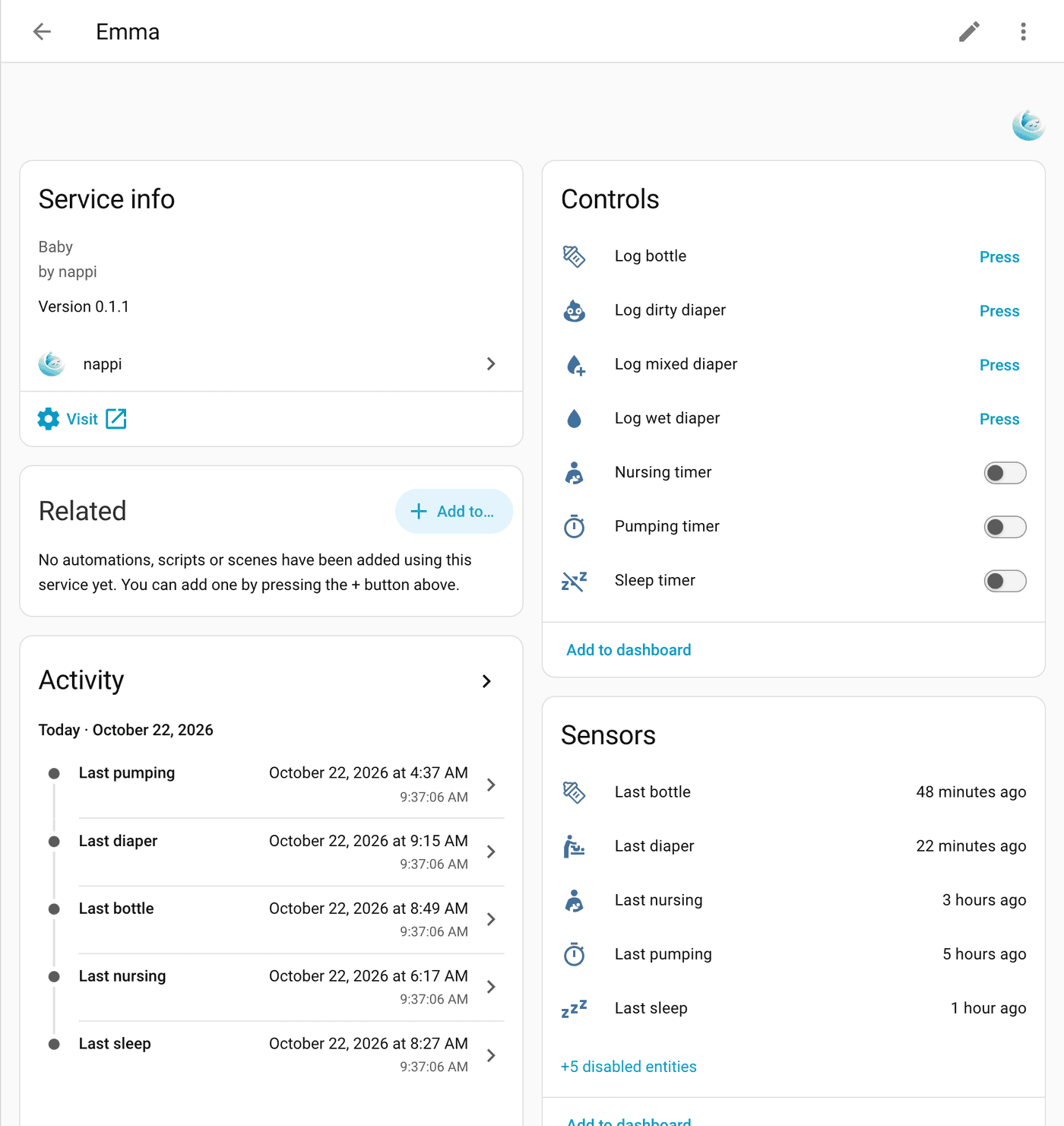
Anything you log from Home Assistant appears in the nappi app for the whole family within seconds. Anything logged in the app reaches Home Assistant within a minute.
Four automations worth setting up
A button by the changing table. Any Zigbee or Wi-Fi button that works with Home Assistant will do. In Settings → Automations & scenes, create one that says when the button is pressed, press Log wet diaper. Map a double press to dirty and a long press to mixed if your button supports them.
Lights that dim at nap time. When Sleep timer turns on, dim the nursery lights to 10%. Add a second automation that brings them back when the timer turns off.
"When did she last eat?" on a kitchen screen. Put the Last bottle or Last nursing sensor on a dashboard. Home Assistant shows it as "2 hours ago" and keeps it current.
"Hey Google, turn on nap." With Home Assistant Cloud, open Settings → Voice assistants, expose the Sleep timer switch to Google Assistant or Alexa, and rename it to something easy to say. If Alexa is your only goal, nappi's own Alexa skill does it without Home Assistant. Our smart home page lists every option.
If something stops working
Home Assistant asking you to reconnect means the key expired, was disconnected, or its owner left the family in nappi. Make a new key as in Step 1 and paste it in.
A repair saying Premium ended goes away by itself: renew Premium in the nappi app and the integration reconnects within a minute.
If a button press didn't show up, check the nappi app before pressing again. A press that loses its connection is retried once, and it's never logged twice.
Every connection key is listed in the nappi app under Settings → Connections → Smart home, where you can disconnect any of them.
FAQ
Do I need to know how to code?
No. Every step above is clicking and pasting. If you're curious, the API reference shows every request the integration makes.
Does it work with Google Home without Home Assistant?
No. Google Home works through Home Assistant, using Home Assistant Cloud or Google's own setup.
Can my partner use it too?
Yes. Everything logged from Home Assistant lands in your shared nappi family, so your partner sees it in their app right away. Each of you can make your own key, too.
What can a connection key do?
It can log entries, run timers and read the latest entries for your family, the same things you can do in the app. It can't change your account or see your password. Keep it private, and disconnect it in the app if it ever leaks.